One timeline is enough
blusco ∅ is the next model of blusco.
Your windows, your feeds and your own posts. One timeline.
blusco ∅ is the next model of blusco.
Your windows, your feeds and your own posts. One timeline.
The official Bluesky app, X and Threads share one layout. Tabs on top. Posts flow as cards. Tap one and another page opens. blusco ∅ drops that layout. Six differences. Gray sketches on the left show the Twitter style; blusco ∅ is on the right.
1
Following, For You, Lists. Every place to read gets its own tab. Every tab is another screen.
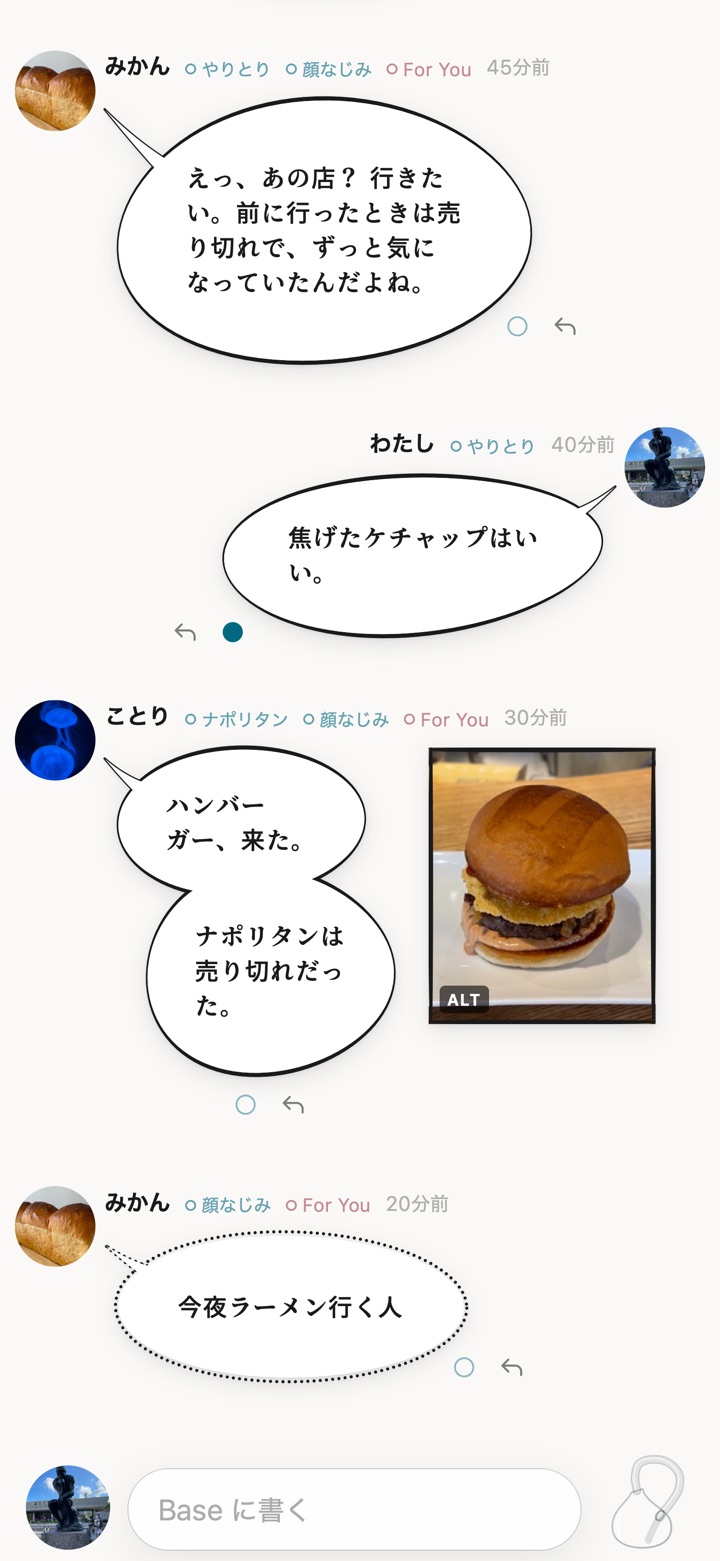
Windows, feeds and your own posts mix into one timeline. The small dot after a name marks where the post came from. A post in two windows gets two dots.
2
Tap a tab and the screen is replaced. Where you were reading stays behind in the old tab.
Tap a dot. The timeline folds down to that source. The other posts are not deleted; they fold into bellows pleats. The balloon you tapped stays under your finger. Tap the bellows on top to unfold.
3
To read replies, you tap the post and go to a thread page. Then you tap back. The timeline only shows scraps of conversations.
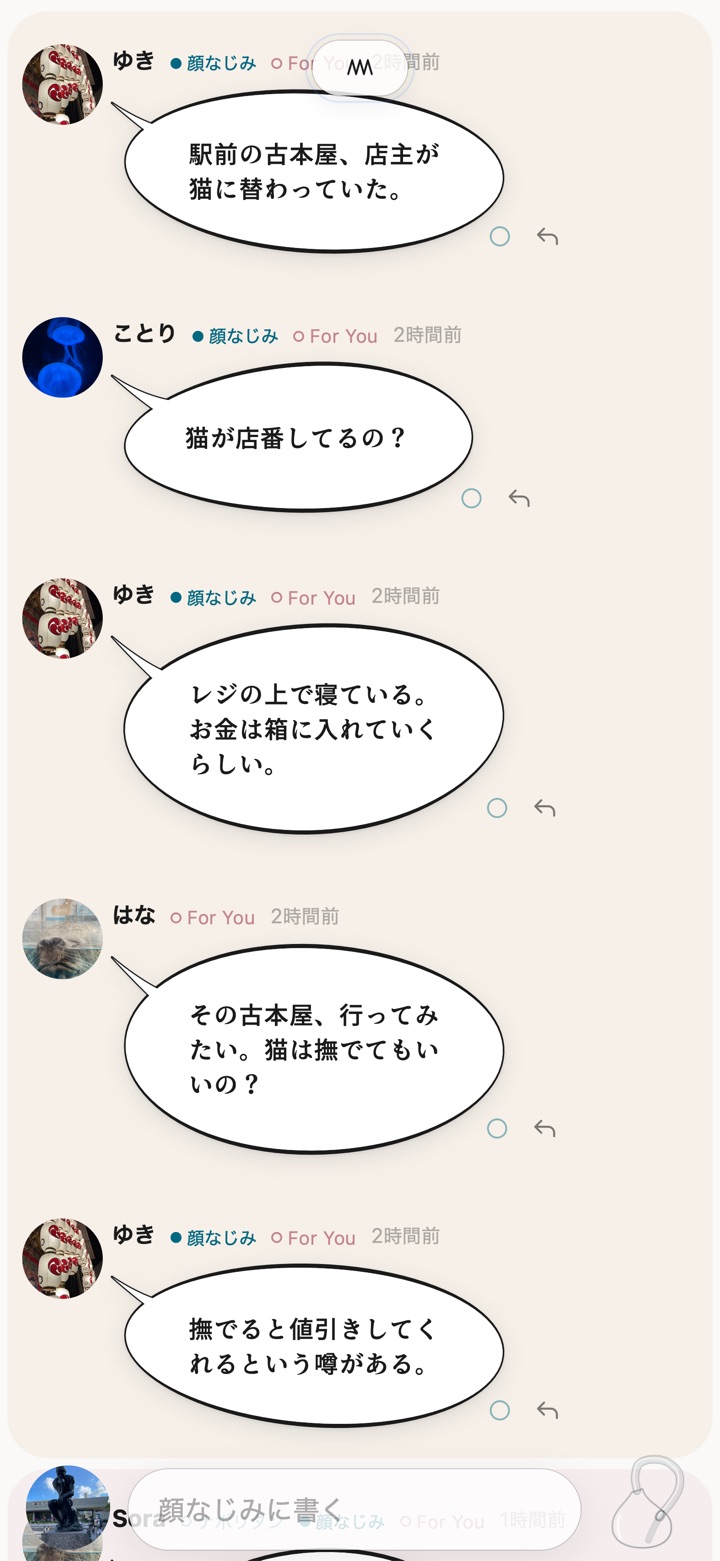
In a folded timeline, each conversation appears whole, on its own tint. When an old post gets a reply, the whole conversation moves up to now. No copies are made. A post never appears in two places.
Folded to Familiar faces. The bookstore-cat conversation sits on one tint. Hana is not a familiar face. Her reply joins the block anyway.
4
Everything from everyone you follow flows in. Each of them talks to their own audience, about their own thing. You open the app expecting a circle. There is no conversation anywhere in it. The other half of each talk is off screen.
The Familiar faces window shows only conversations among your familiar faces, or with you. Solo posts on other topics stay out. To read them, tap the name and fold to that person. On days with little talk, it goes quiet. That is fine.
5
On launch, the app asks a server for your timeline. The server holds everyone’s posts. The screen waits until it answers.
Last time’s timeline stays on your device and shows the instant you open. New posts are fetched straight from where each person keeps them. While open, new posts flow in about a second after they are written. Posts from people in your windows never pass through the server that holds everyone’s posts.
Measured on an iPhone Air. New posts from 36 people in windows: 1.06–1.75 s. Everything, including saved feeds and keyword windows: 2.05–3.68 s. The design: the Crystal Radio Model.
6
Home, search, notifications, messages, profile along the bottom. One screen per icon.
The bottom bar holds three things. Your icon on the left, the compose field in the middle, the blusco clock on the right. Tap your icon for search and settings. Write while folded and the post goes into that window. Tap the clock to jump to the newest post.
From the features built for blusco, anything that did not fit one timeline is gone.
A like is a blue dot. Pressed or not. No shades by count. No numbers.
Posts carried in by others stay out. Your windows decide whom you read.
A notice fades after one second on screen. The reply itself stays in the conversation. The notice does not need to.
Add someone to a window, fold to them. They get nothing. No follows are created.
ATProto OAuth. Your password never reaches blusco ∅.
Export them from blusco. Import them into ∅.
All you need is a Bluesky account.
To try it without signing in, open the demo.
The iPhone version is in development and not yet public. The current blusco is here.